Analyze AI-Assisted Requirements & Research
AI-assisted requirements gathering, research synthesis, feasibility analysis, and stakeholder alignment. Surface insights before you write a single line of code.
Analyze is where a vague request becomes a problem an agent can be trusted with. An agent reads the tickets, interviews, support logs, analytics and code and drafts what it finds; a product owner decides what is real and signs a Requirements Brief with testable criteria. This page covers the inputs, five worked rewrites, an annotated sample brief, how to size the work, who owns it and how to tell when the phase is done.

What is the Analyze Phase?
The Analyze phase is the foundation of any successful project. Before design, before code, before anything else - you need to understand what you're building and why.
Traditionally, this phase involved countless meetings, manual document reviews, and trying to synthesize information from disparate sources. AI transforms this by acting as a tireless research assistant that can process vast amounts of information quickly - and research agents can now pull directly from your own docs, tickets, and codebase through MCP connections, not just what you paste into a chat.
In the Analyze phase, AI helps you:
- Extract requirements from stakeholder conversations and documents
- Synthesize research across multiple sources
- Identify gaps and potential risks early
- Generate clarifying questions you might have missed
- Create structured analysis documents
Quick Reference
Research Assistant
Requirements docs, analysis reports
Claude, ChatGPT, Perplexity, Gemini Notebook
Product owner, with the tech lead
Requirements Brief signed off
Inputs and Outputs
Every phase in AIDLC is defined by what it takes in and what it must hand over. Analyze is the only phase that starts from the outside world: people, documents, and the evidence a running system produces.
What it receives
- Stakeholder conversations: meeting transcripts, emails, interview notes, and chat threads.
- Existing material: product docs, tickets, support history, and the relevant parts of the codebase, reached through governed connectors rather than pasted into a prompt.
- Backlog items sent back by the Curate phase: incidents, escaped defects, and what monitoring revealed.
- Constraints from outside the team: budget, deadlines, compliance duties, and the data classification of what the feature will touch.
What it hands off
- A Requirements Brief, the single artifact Ideate receives.
- Problem statement: what is wrong today, for whom, and why it matters now.
- Users and acceptance criteria written in Given/When/Then form, so each one can later become a test.
- Constraints, open questions with named owners, and a risk list.
The brief is the contract with the next phase
Ideate may treat only what is in the signed-off brief as settled. A claim that lives in a chat log, a meeting recording, or a model summary is not a requirement yet. Writing it down in this shape is also the first draft of the ticket contract that later phases depend on.
What to Feed the Agent
An Analyze agent is only as good as the evidence it reads. Five kinds of source material do most of the work. Each one answers a different question, and each one misleads in its own way.
| Source | What it tells you | Ask the agent to | Watch for |
|---|---|---|---|
| Tickets | What has already been asked for, and how often | Group duplicates and list every distinct request with its ticket link | Tickets describe solutions. The problem behind them is rarely written down. |
| Interviews | Why people want it, in their own words | Quote the sentence behind each requirement, with the speaker | A confident stakeholder is not the same as a common need. |
| Support logs | Where the product fails people today | Find recurring complaints and the workaround customers use | Personal data. Use a governed connector, never a paste. |
| Analytics | What people actually do, as opposed to what they say | State which claims the data supports and which it does not | A model will explain a number it was never shown. Check each figure against its source. |
| Code | What the system does now, and what a change would touch | Describe current behavior and name the modules a change would affect | Current behavior is not always intended behavior. |
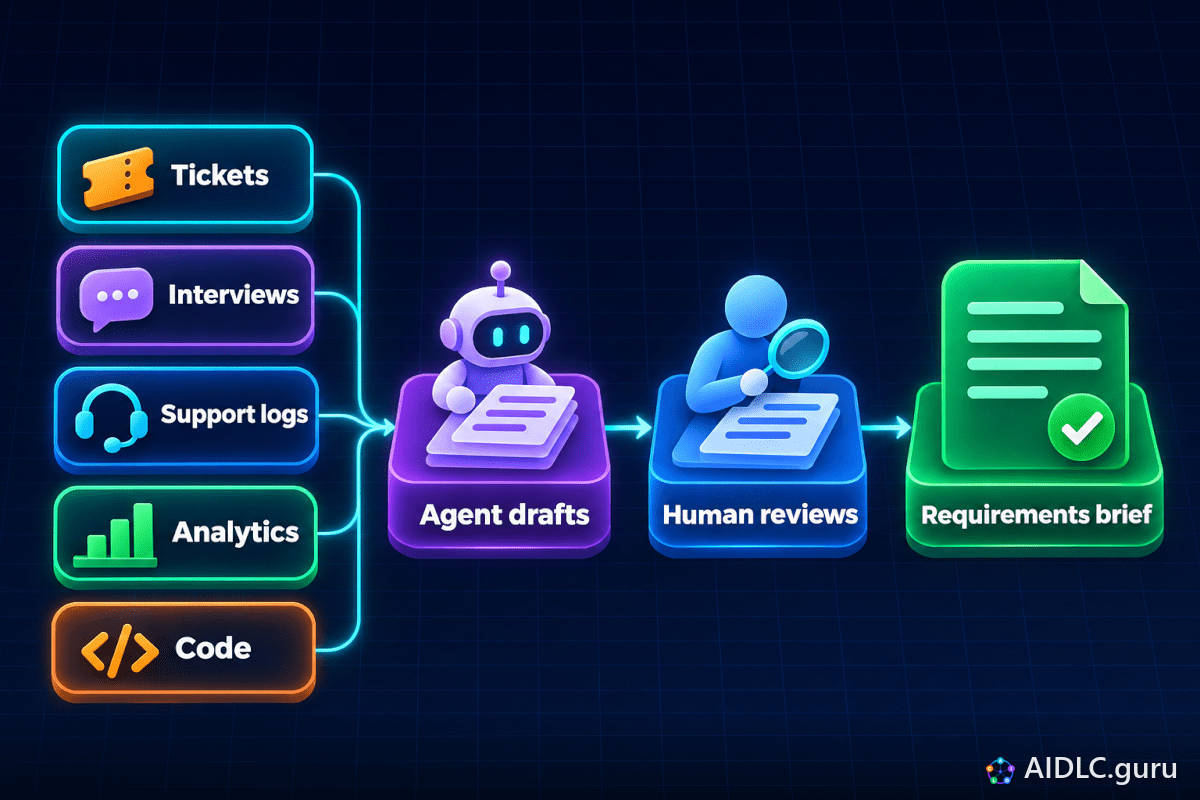
The agent drafts and a human reviews. Nothing from these sources is a requirement until the product owner has read it, checked it against the source and put it in the brief.
Key Activities
Requirements Extraction
Feed AI transcripts of stakeholder meetings, emails, and existing documents. AI identifies explicit requirements, implicit needs, and potential conflicts.
Research Synthesis
AI processes technical documentation, competitor analysis, and market research to provide summarized insights relevant to your project.
Risk Identification
AI identifies potential risks, dependencies, and blockers based on requirements and technical constraints.
Gap Analysis
AI identifies what's missing from requirements, what questions need answering, and what assumptions need validation.
Same Model, Different Results
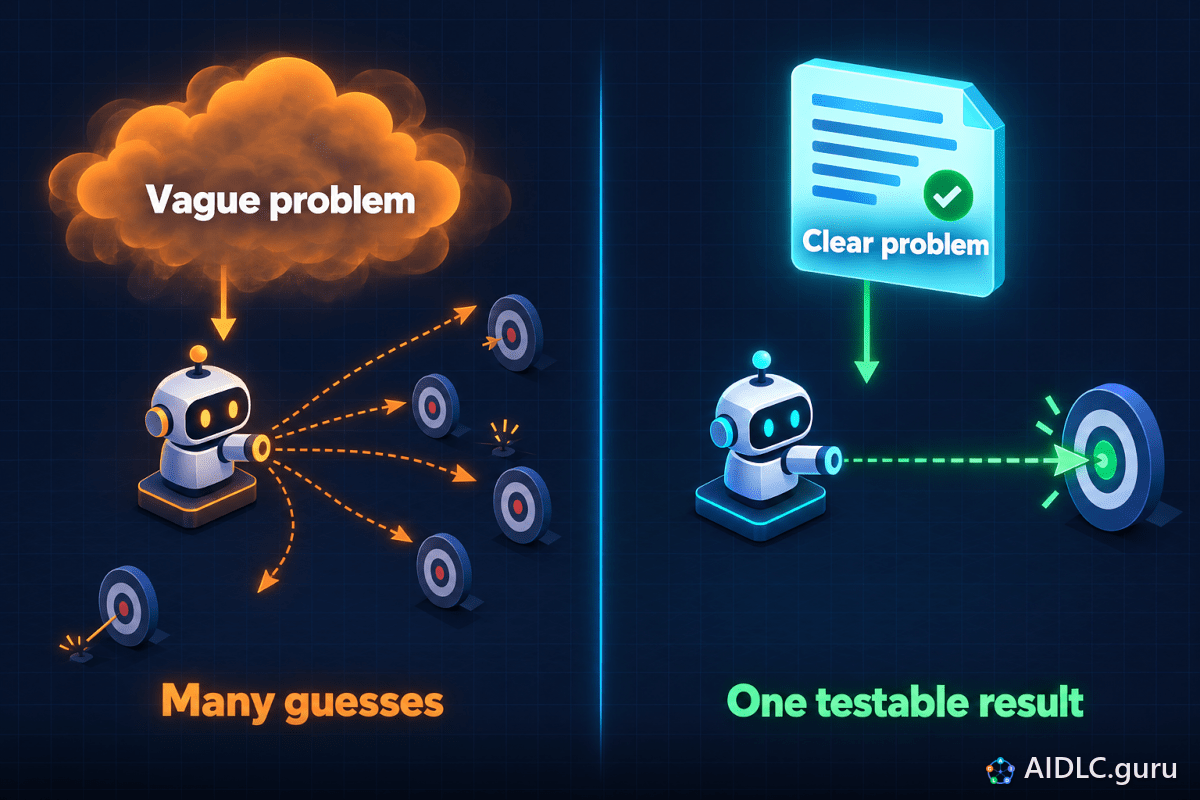
Give two engineers the same model, the same tools and the same codebase, and they will often get very different results. The difference is rarely the model. It is how clearly each of them defined the problem before asking for a solution. An agent builds exactly what it is told and fills every gap with a guess, so a vague problem produces a confident answer to a question nobody asked.
That makes problem definition a skill to be practiced, reviewed and measured, with the same attention teams give to judging the solution. Analyze is where that skill lives; the full guide, with the clarity ladder, a problem review checklist and team exercises, is on Problem Definition.
A vague problem
"Customers want to export their invoices."
Which customers? Which invoices - paid, open, credit notes? In what format, delivered how, how often? What must never appear in the file? The agent will answer every one of these questions for you, silently, and differently each time it is asked.
A clear problem
"Account owners need a scheduled CSV of their paid invoices for their accountant, and must never receive another account's data."
Who, what, why and the one thing that must never happen are in a single sentence. The Given/When/Then criteria, the open questions and the risks follow from it, and every later phase inherits the same answers.
How to treat problem definition as a skill
- Write the one-sentence problem first. Who has the problem, what they need, why, and what must never happen. If it will not fit in a sentence, it is two problems.
- Make the agent restate it before solving. Ask for the problem in its own words, its assumptions and its open questions. A wrong restatement costs a sentence to fix; a wrong solution costs a sprint.
- Review the problem like code. A second person reads the brief before design starts and asks what an agent would have to guess. Their questions go into the brief.
- Measure it. Count how often work comes back to Analyze from later phases, and how many intent change requests trace to a question the brief should have answered. Both are leading indicators of problem-definition quality; see when the intent changes mid-flight.
- Teach it. Pair less experienced engineers with someone who writes sharp briefs, and keep a library of good and bad problem statements from your own work. The same habit underpins context engineering and criteria an agent can test.
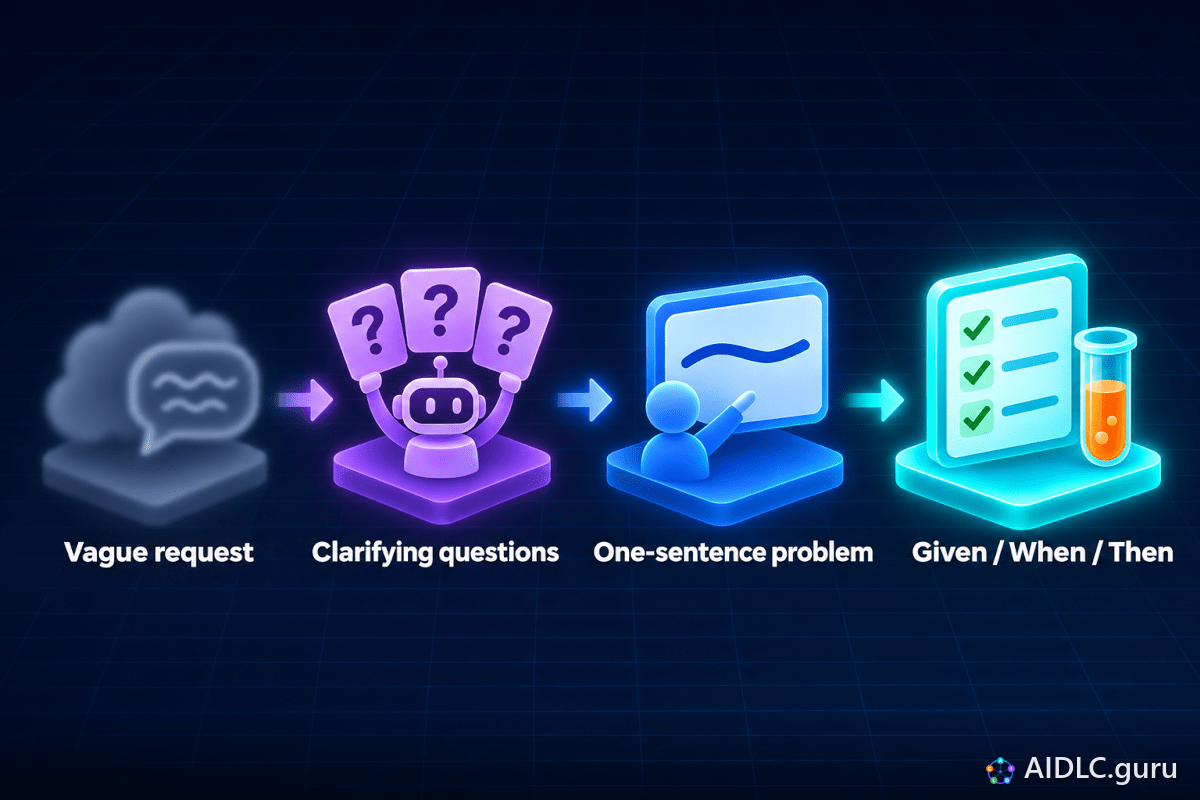
From Vague to Testable: Five Rewrites
The fastest way to learn Analyze is to watch a request change shape. Every one goes through the same four steps: the vague request, the clarifying questions it raises, a one-sentence problem, and a first criterion written as Given/When/Then.
The five requests below are invented, but you have seen each of them in a real backlog. Read across a row to see what an agent would have had to guess, and what the product owner wrote instead.
| Vague request | What the agent would have to guess | One-sentence problem | First criterion |
|---|---|---|---|
| "Make the dashboard faster." | Which page, for whom, and how fast counts as fast | Operations managers wait too long for the orders dashboard at the start of a shift, and must never be shown stale totals. | Given an account with a full day of orders, when the dashboard opens, then the totals appear within 2 seconds and match the order records. |
| "Add single sign-on." | Which provider, which users, and what happens to existing passwords | Enterprise admins need their staff to sign in with the company identity provider, and nobody outside the company domain may ever get in. | Given a user whose address is outside the company domain, when they attempt single sign-on, then access is refused and the attempt is logged. |
| "Users should get notified." | Notified of what, by which channel, how often, and whether they can opt out | Customers with an order in transit need to know when the delivery date changes, and must never be messaged after opting out. | Given a customer who has opted out, when a delivery date changes, then no message is sent. |
| "Clean up the billing code." | What clean means, and which behavior must not change | Engineers cannot change a tax rule without editing the invoice module, and no invoice total may change as a result of this work. | Given the recorded set of past invoices, when they are recalculated on the new code, then every total is identical. |
| "Support bulk upload." | The file format, the size limit, and what happens to a bad row | Warehouse staff need to add a day of stock from one spreadsheet, and one bad row must never block or corrupt the rest. | Given a file with one invalid row, when it is uploaded, then the valid rows are saved and the invalid row is reported with its line number. |
Every rewrite names a person
Operations managers, enterprise admins, warehouse staff. "Users" is not a person, and an agent cannot weigh a trade-off for nobody in particular.
Every rewrite has a "must never"
The failure that makes any solution unacceptable is the most useful line in the brief. It usually becomes the first criterion, as it did in four of the five rows.
No rewrite names a solution
Caching, a queue or a new library is a design choice. It belongs to Ideate, where it can be compared with the alternatives.
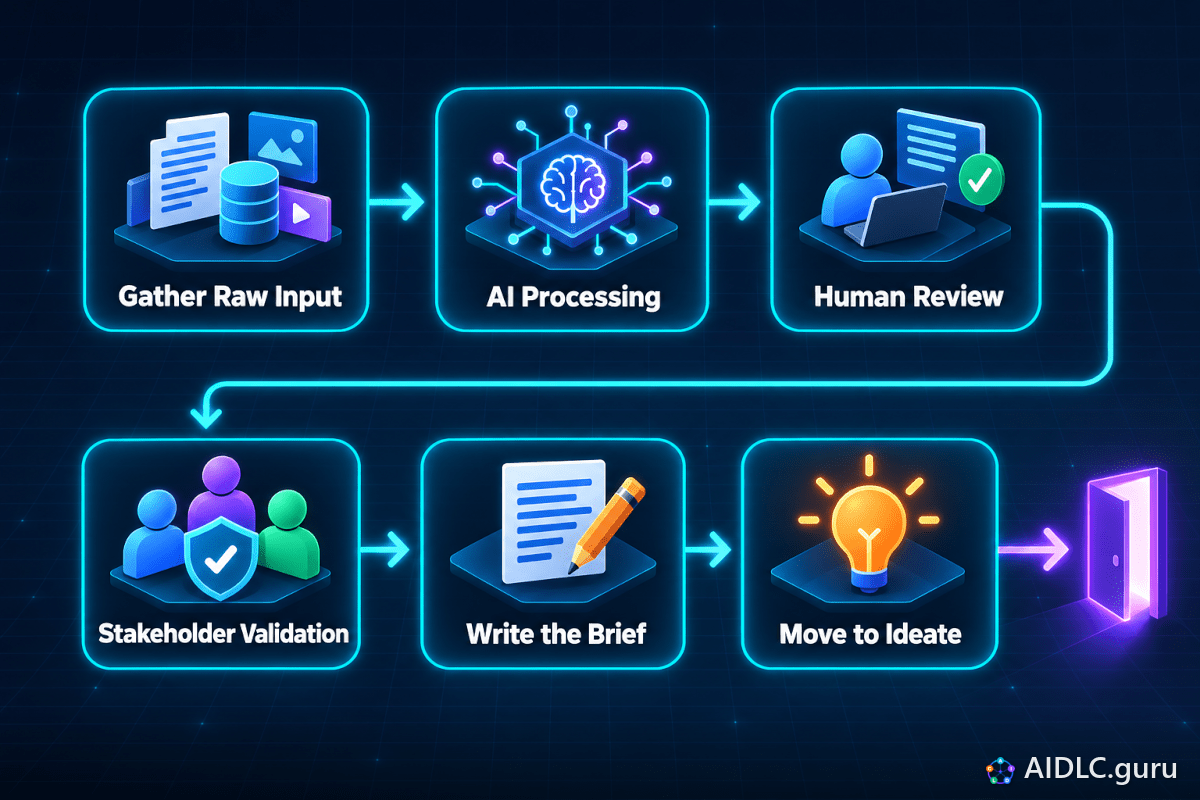
Example Workflow
Gather Raw Input
Collect meeting transcripts, emails, existing documentation, and stakeholder notes. Check the data classification of each source before it reaches a tool.
AI Processing
Feed documents to AI with prompts to extract requirements, identify risks, and generate questions. Ask it to quote the source line for every requirement it reports.
Human Review
Review AI output, validate accuracy, and add domain knowledge AI may have missed. Strike anything the sources do not support.
Stakeholder Validation
Present synthesized requirements back to stakeholders for confirmation and refinement. Resolve conflicts between stakeholders as a decision, not as a summary.
Write the Requirements Brief
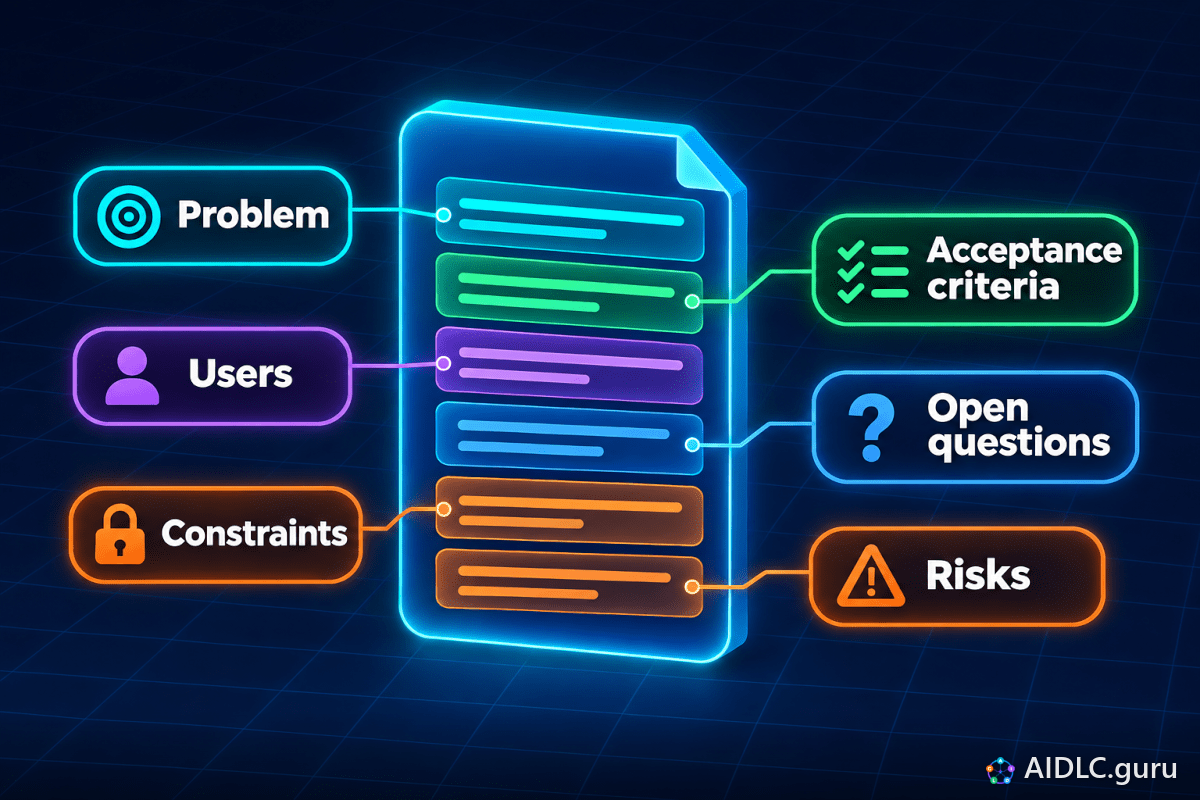
Assemble the problem statement, users, Given/When/Then acceptance criteria, constraints, open questions, and risk list into one document. The product owner signs it off.
Move to Ideate
With validated requirements - the spec that steers every downstream agent - proceed to the Ideate phase. See Context & Spec-Driven Development.
The Requirements Brief, Annotated
The brief has six parts. Here is a short one for an invented feature, so you can see how little it takes when each part does its job. It is an illustration, not a case study.
REQUIREMENTS BRIEF: Scheduled invoice export

PROBLEM
  Account owners cannot give their accountant a list of
  paid invoices without asking support for it each month.

USERS
  Account owners on paid plans. Their accountant is the
  reader of the file, not a user of the product.

CONSTRAINTS
  Invoice data is classified Confidential.
  No new third-party service. Ships behind a flag.

ACCEPTANCE CRITERIA
  AC-1 Given an account owner with paid invoices,
       when the monthly schedule runs,
       then they receive a CSV of that month's paid invoices.
  AC-2 Given an account with no paid invoices,
       when the schedule runs,
       then no file is sent and nothing fails.
  AC-3 Given two accounts,
       when either export runs,
       then it never contains the other account's invoices.

OPEN QUESTIONS
  Which time zone defines "month"?        Owner: product
  Is a refunded invoice "paid"?           Owner: finance

RISKS
  Cross-account data exposure (see AC-3).
  Large accounts may exceed the export time limit.

SIGNED: product ownerOne or two sentences on what is wrong today and for whom. It names no solution, so Ideate is free to find the best one.
The specific people affected. Naming who is not a user is as useful as naming who is.
What any design must respect: data classification, budget, dates, compliance duties.
Given/When/Then, each with an ID. In Develop every one becomes at least one test, so a criterion nobody could test is not finished.
What is still unknown, each with a named owner. An honest open question is better than a guessed answer.
What could go wrong, tied to the criterion that guards against it where there is one.
Where Analyze fits when a team is just starting
Most teams do not adopt Analyze first. Engineers start using coding agents, find that vague stories are now the slow part, and ask product for clearer ones. That request is the opening for this phase. Crawl, Walk, Run describes the order in which teams usually bring each group in.
Right-Size the Analysis
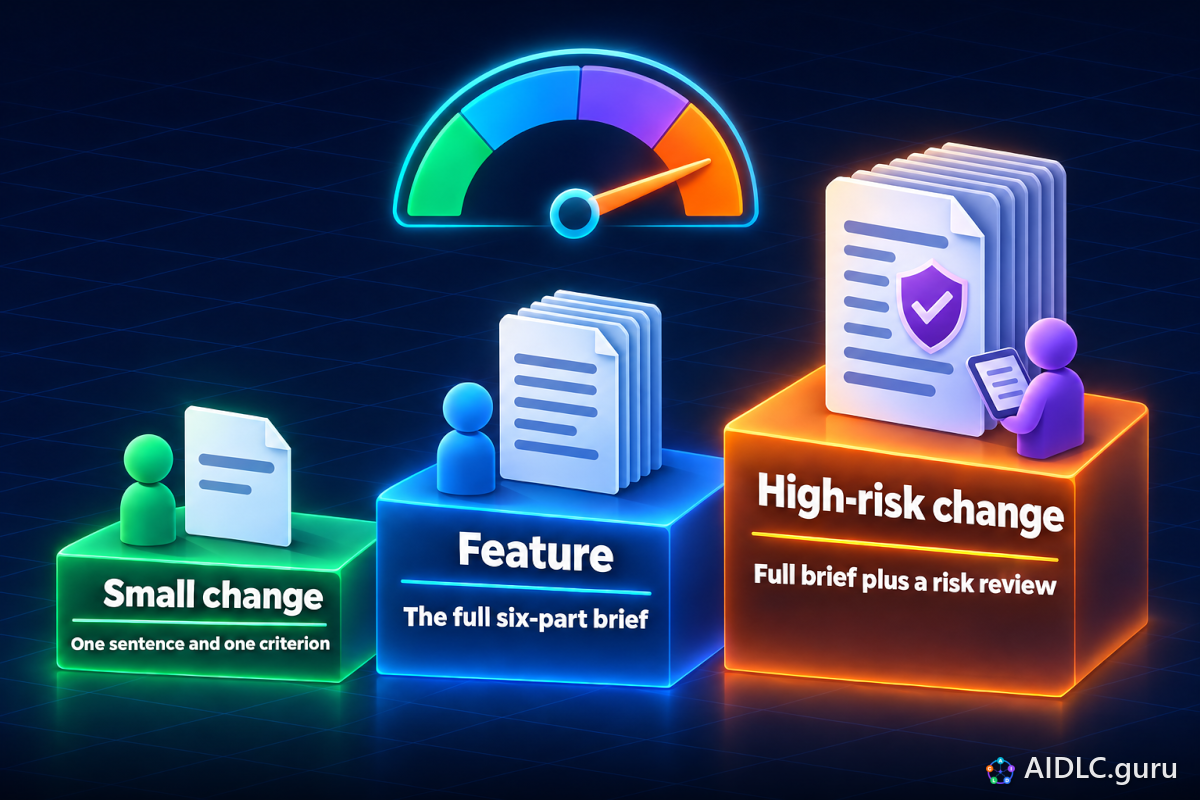
Analyze is not a fixed amount of paperwork. A copy fix and a payments rewrite do not deserve the same brief, and giving them the same one is the fastest way to make a team resent the phase. Match the depth of the analysis to what the change could break.
| Size of change | Examples | How much Analyze | Who signs |
|---|---|---|---|
| Small change | A copy fix, a configuration value, a bug with a known cause | One sentence and one criterion, written in the ticket itself | Product owner, in the ticket |
| Feature | New behavior for a user, shipped behind a flag | The full six-part brief | Product owner |
| High-risk change | Authentication, money, personal data, migrations | The full brief plus a risk review by the tech lead before Ideate starts | Product owner and tech lead |
Signs you did too little
- Work comes back from Ideate or Develop with a question the brief should have answered.
- Two engineers read the same ticket and build two different things.
- The agent's plan contains decisions nobody on the team made.
Signs you did too much
- The brief is longer than the change it describes.
- The brief specifies the design, so Ideate has nothing left to decide.
- Small fixes wait in a queue for a sign-off meeting.
The same idea governs review later on: effort follows risk. See the risk tiers on Engineering Practices.
Who Owns It
The product owner is accountable for the brief: what is in scope, what is not, and which stakeholder wins when two disagree. The tech lead is accountable for the feasibility notes and the risk list. A model can be fast and thorough at the reading, but it holds no accountability for the answer.
What the AI drafts
- Extract candidate requirements from transcripts and documents, with the source line quoted.
- Group, de-duplicate, and flag statements that conflict.
- Draft clarifying questions and a first pass of Given/When/Then criteria.
- Propose risks and dependencies from the stated constraints and the codebase.
What humans decide
- Which requirements are real, and which are noise or wishful thinking.
- Priority, scope, and the call between conflicting stakeholders.
- Whether a risk is acceptable, mitigated, or a reason to stop.
- Sign-off on the brief. Nothing leaves Analyze without a named human approving it.
Humans own decisions and merges in every phase; Analyze is where that habit starts. For the rules on which data may reach a tool at all, see the usage policy outline and Governance Before Scale.
Entry and Exit Criteria
Entry criteria
Start the phase when all of these are true.
- A named product owner exists for the request.
- The request is a real problem or a backlog item sent back from Curate, not a solution in disguise.
- The source material has been classified, and the tool in use is approved for that data tier.
- A baseline for the metrics this work will affect has been captured, or its absence is noted.
Exit criteria
Leave the phase only when all of these are true.
- The Requirements Brief has all six parts: problem, users, acceptance criteria, constraints, open questions, risks.
- Every acceptance criterion is testable as Given/When/Then.
- Every open question has an owner, or has been answered and recorded.
- The tech lead has reviewed the risk list and feasibility notes.
- Stakeholders have confirmed the brief, and the product owner has signed it off.
Best Practices
Quote the source for every requirement
Ask the model to attach the exact line it drew each requirement from. A requirement with no quote is a guess and goes on the open-questions list instead.
Ask for conflicts and gaps, not just a summary
A model asked to summarize will smooth over disagreement. Ask it explicitly to list contradictions, missing actors, and unstated assumptions.
Write acceptance criteria as Given/When/Then
Criteria in that form become the tests that Ideate, Develop, and Launch check against. Prose criteria get reinterpreted at every step.
Use governed connectors for internal data
Let research agents read docs, tickets, and code through approved MCP connections. Do not paste restricted data into a chat window.
Do not treat a fluent answer as a verified one
AI output reads as confident whether or not it is right. Every claim a decision rests on needs a human to confirm it against the source.
Anti-Patterns
These are the ways Analyze most often goes wrong. The named patterns are catalogued on Twelve Ways AI Adoption Fails.
Summaries mistaken for requirements
A tidy model summary of a meeting gets filed as the requirements. Nobody checked it against the people in the room, and the first wrong inference ships as a feature.
Governance After the Incident
Sensitive material is pasted into a tool before any policy says it may be. The fix is the usage policy first; see the failure pattern of the same name.
One-Size-Fits-All Adoption
Every request gets the same depth of analysis, whether it is a copy change or a payments rewrite. Match the rigor of the brief to the risk of the work.
Measuring Without Baselines
Nobody records how long this kind of work took before AI, so every later claim of improvement is a story. Capture the baseline here, before the work starts.
What to Measure
Analyze rarely moves a metric directly, but it sets up the ones that tell you whether the whole loop is working. Pick from the list on Measuring Impact.
Cycle time, ticket to production
Requirements churn shows up here first. If the median is fine but the 85th percentile is long, look for briefs that were reopened after Develop began.
Bug escape rate
Count the escaped defects that trace back to a missed or ambiguous requirement. A high share means the brief is not catching enough.
Developer survey
Ask whether the briefs were clear enough to build from. It is a cheap signal that catches vague acceptance criteria early.
The baseline itself
Record the current numbers for the workflow before the first AI-assisted change. Without it, no later number in any phase means anything.
Report each number against its baseline, not on its own.
Go Deeper
Frequently Asked Questions
An agent reads the source material - tickets, interviews, support logs, analytics and code - and drafts the requirements, conflicts, gaps and risks, with the source line quoted for each. A person checks that draft against the sources and the stakeholders, and the product owner signs a Requirements Brief with testable acceptance criteria. The signed brief is the only thing the Ideate phase receives.
AI does the reading. It can extract candidate requirements from transcripts and documents, group duplicates, flag statements that conflict, list the questions nobody has asked and draft Given/When/Then criteria. It cannot decide which requirements are real or which stakeholder wins a disagreement. Those calls stay with the product owner.
A Requirements Brief is the one document the Analyze phase hands to Ideate. It holds the problem statement, the users, acceptance criteria written as Given/When/Then, constraints, open questions, and a risk list. A product owner signs it off, so every later phase works from the same written agreement instead of a chat history.