MCP in AIDLC: Connecting Agents Safely
The Model Context Protocol is how most coding agents now reach your tracker, your docs, your repository and your pipeline. That is powerful and risky in equal measure: every connection is a new way for an agent to read something it should not, or change something it should not. This page shows which servers each AIDLC phase actually needs, how to split reads from writes, how to design permissions, and how to vet a server before it gets a token.
What MCP Is
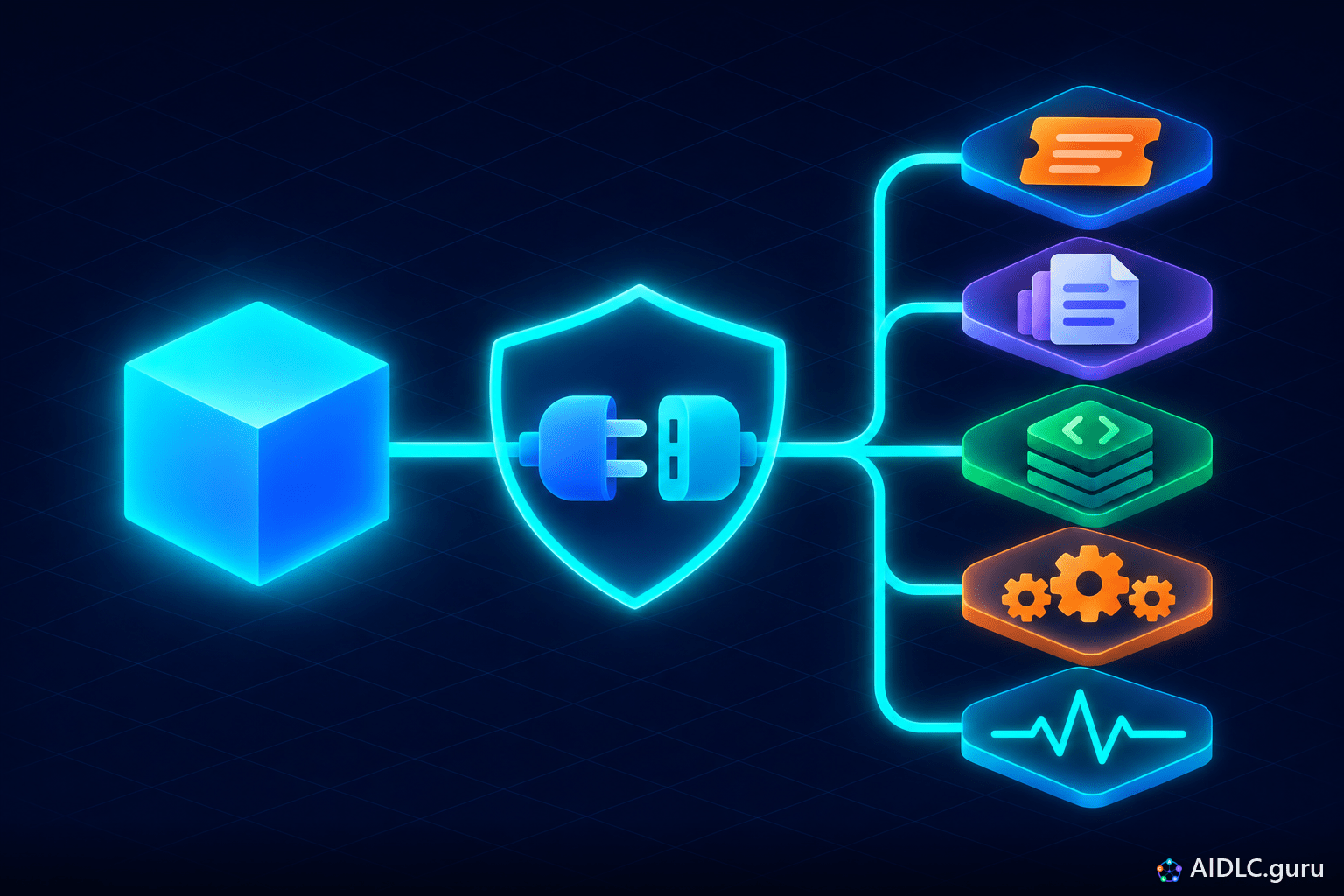
The Model Context Protocol (MCP) is an open standard for connecting AI agents to outside systems. A server exposes a set of tools (actions an agent can call), resources (data it can read) and sometimes prompts; an agent client such as a coding assistant connects to one or more servers, lists what they offer and calls them as part of its work. Instead of every tool shipping a custom integration for every system, a tracker or a database publishes one server and any compliant client can use it.
For AIDLC the important point is not the wire format but the consequence: an MCP server is a capability grant. Whatever the server can do with the credentials it holds, the agent can do, including the things nobody thought to forbid. Treat each server the way you would treat a new service account, because that is what it is. The Tools page covers the agents that act as MCP clients, and Context Engineering covers how tool output enters the agent's context.
Which Servers Each Phase Uses
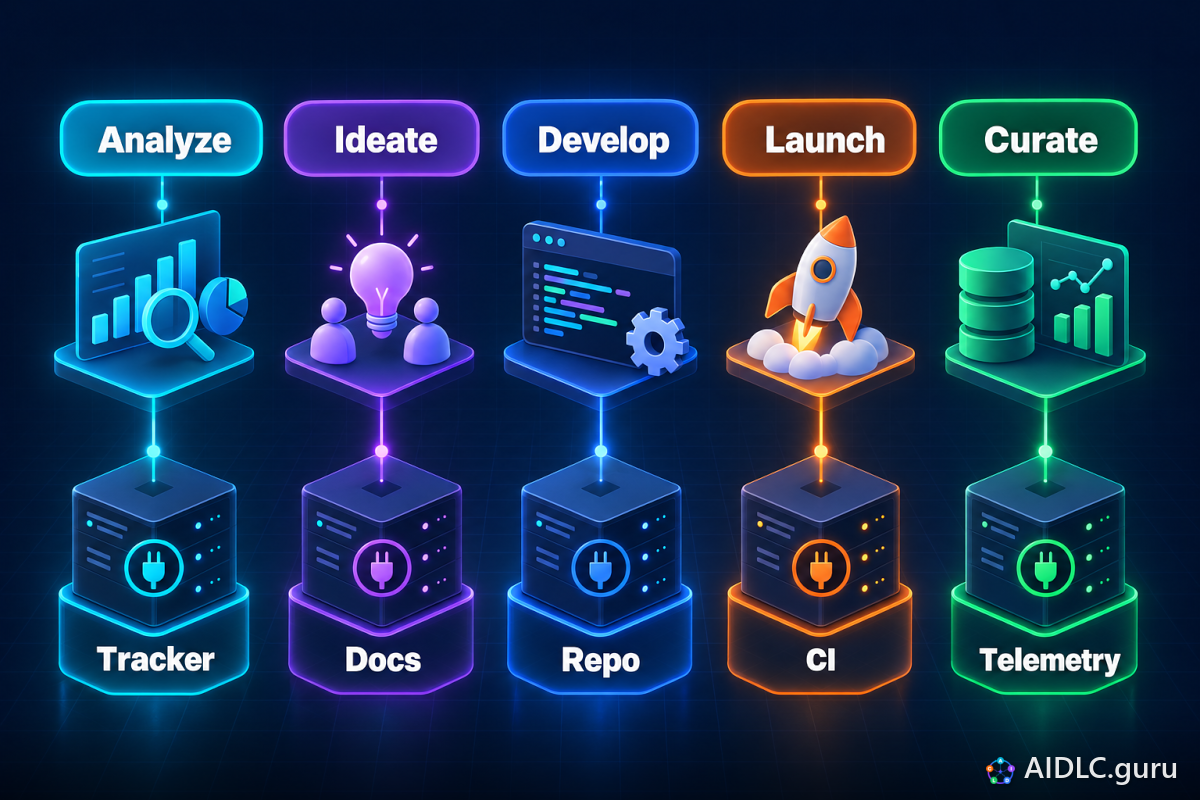
Five kinds of server cover most of the cycle. Connect them phase by phase, as the work needs them, rather than wiring all five on day one. The names below are categories, not products.
| Phase | Main server | What the agent does with it | Default access |
|---|---|---|---|
| Analyze | Tracker | Reads tickets, comments and linked issues to draft the problem and criteria | Read; comment on a draft only |
| Ideate | Docs | Searches design notes, ADRs and API contracts so options respect past decisions | Read |
| Develop | Repo | Reads code and history, opens branches and pull requests | Read; write to its own branch only |
| Launch | CI | Reads build and test results, re-runs a failed job, reads the release checklist | Read; trigger on its own branch |
| Curate | Telemetry | Queries logs, metrics and error reports to compare outcomes with the criteria | Read, scoped and redacted |
Servers also cross phases: the tracker is read again in Develop for the ticket contract, and the repo server is read in Curate to link a defect to the change that caused it. The point of the table is the default, not a wall. Note how few default accesses include any write at all.
Read Plane and Write Plane
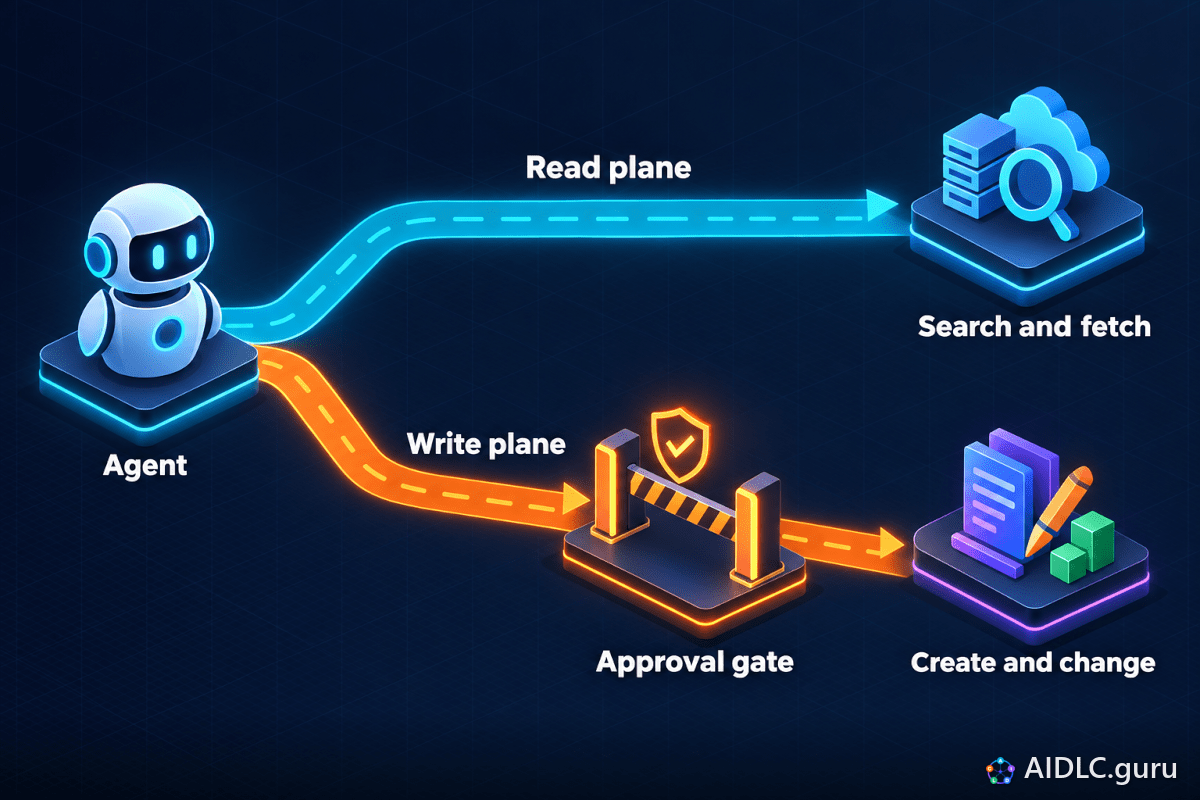
Split every server's tools into two groups and treat them differently. The Agent Orchestration page describes a read plane for gathering context; the same split works at the tool level.
Read plane
Search, fetch, list, query. No side effects, so it can run freely and in parallel. It still needs scoping (which projects, which tables, which fields), because a read can leak data and, as the risks below show, a read can also deliver an attack.
Write plane
Create, update, delete, merge, deploy, send. Each call changes something outside the agent's sandbox. Writes go through an approval gate: a person confirms the specific action, or a policy engine allows a narrow, pre-approved class of actions such as commenting on a draft or pushing to the agent's own branch.
Invented example: a tracker server offers eleven tools. Five are reads (search, get ticket, list comments, get linked issues, list sprints). Four are low-risk writes (add comment, add label, link issue, attach file). Two are high-risk (transition ticket, delete ticket). The team enables the five reads for every agent, the four low-risk writes for the Analyze agent behind a confirmation, and never exposes the delete tool at all.
Permission Design
Least privilege has two dimensions here: which agent role, and which phase. An agent that drafts criteria in Analyze has no business holding a deploy tool, and a Develop agent does not need to read production telemetry.
One identity per role
Give each agent role its own service account and token, never a person's. Revoking one role then affects nothing else, and the audit trail names the role.
Allow-list the tools
Enable the specific tools a role needs, not the whole server. A server that exposes thirty tools is not thirty permissions you accepted.
Scope the credential
Narrow the token itself to one repository, one project or one dataset, with the shortest expiry that works. Tool allow-lists fail open if the token is broad.
Widen by phase, not by default
Grant access when a phase starts and drop it when it ends. The ticket's risk tier decides how much; see the ticket contract.
| Agent role | Reads | Writes | Never |
|---|---|---|---|
| Analyst | Tracker, docs | Draft comments | Change ticket status |
| Implementer | Repo, docs, tracker | Its own branch, pull requests | Merge, edit locked tests, push to main |
| Reviewer | Repo, CI results, tracker | Review comments | Approve its own work |
| Release | CI, telemetry | Prepare a release, never ship | Deploy without a named human |
MCP-Specific Risks and Controls
These extend the general threat model on the Security and Compliance page; the controls reuse the same ideas of least privilege, no self-approval and logging everything.
| Risk | How it happens | Controls |
|---|---|---|
| Prompt injection via tool output | A ticket, web page, comment or log line contains instructions. The agent reads it through a trusted tool and treats it as a command. | Treat all tool output as untrusted data; keep write tools out of any session that reads untrusted content; require approval on writes; never let output choose which tool to call next unchecked |
| Over-broad tools | One generic tool such as "run query" or "call API" can do anything its credential allows. | Prefer narrow, purpose-built tools; allow-list per role; scope the credential; disable tools that cannot be bounded |
| Untrusted or malicious servers | A third-party server ships hostile code, or changes its tool descriptions after you approved them. | Vet before install; pin the version; run sandboxed; re-review when the tool list or descriptions change |
| Data leaving through a tool | The agent reads sensitive data from one server and passes it to another that sends it outside. | Classify data by server; block cross-server flows for restricted data; limit servers with outbound network access |
| Credential exposure | Tokens sit in a config file committed to the repository, or in the agent's context. | Reference secrets from the environment or a secret store; never put them in the instruction file or a prompt; rotate on any suspicion |
The core defense against injection is structural, not clever wording: an agent that can read untrusted text should not hold a tool that can do damage in the same session. Splitting the read plane from the write plane is what makes that possible.
Vetting a Third-Party MCP Server
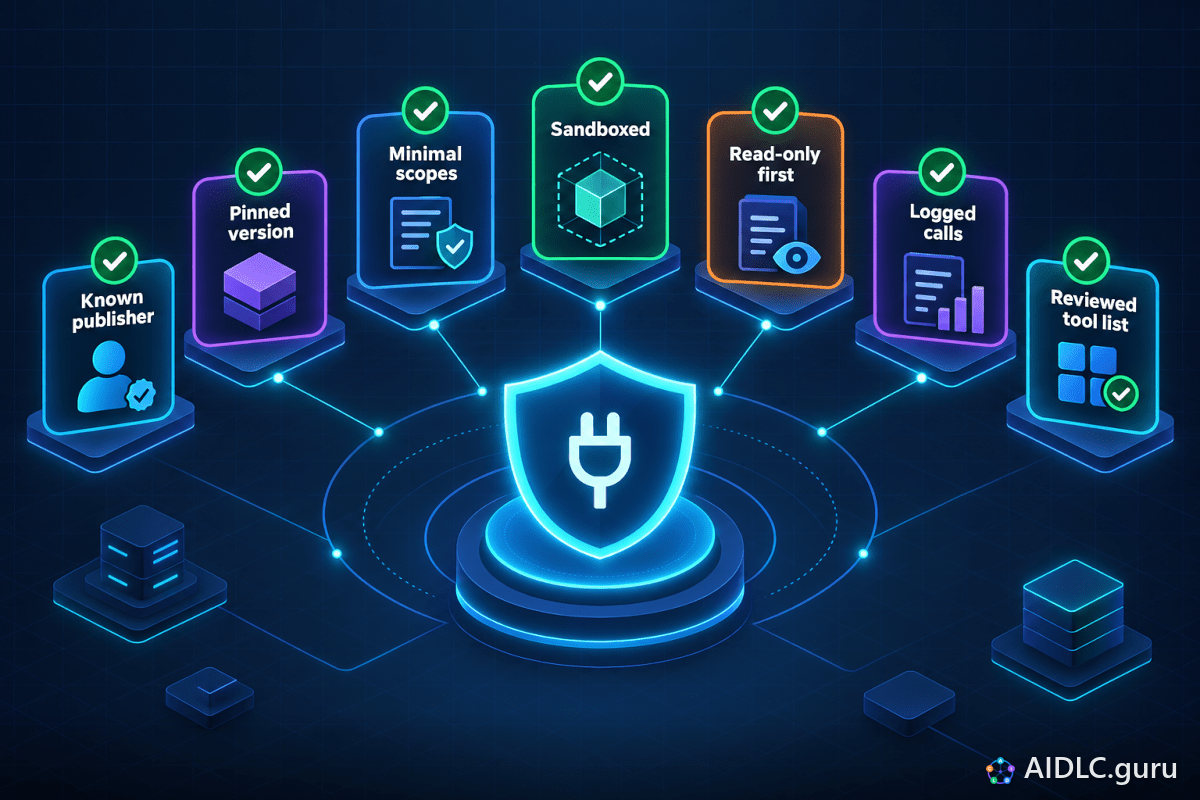
Installing a server is closer to adding a dependency with network access and a credential than to installing a plugin. Run this checklist once per server and again on every version change.
MCP SERVER VETTING (one per server, re-run on version change)

[ ] Publisher: known and accountable? Is the source open to read?
[ ] Version: pinned to an exact release or commit, never "latest"?
[ ] Tool list: have we read every tool name and description?
[ ] Scopes: smallest credential that works? Expiry set?
[ ] Isolation: runs sandboxed (container or restricted user),
    with network access limited to what it needs?
[ ] Start with read-only: are the write tools disabled at first?
[ ] Data: what leaves our network, and to whom?
[ ] Logging: can we record every call and its arguments?
[ ] Change control: how will we learn the tool list changed?
[ ] Exit: how do we revoke the token and remove it in one step?

DECISION: approve / approve read-only / reject
REVIEWED BY:                      DATE:
A local server that runs on a developer machine inherits that machine's access, so sandboxing matters most there. A remote server holds your data on someone else's infrastructure, so the questions about data and logging weigh more.
Configuration Example
An illustrative, generic client configuration for the Develop-phase Implementer role. Field names differ between clients and the servers are invented, so read your client's documentation and treat this as a shape, not a recipe.
{
  "role": "implementer",
  "servers": {
    "tracker": {
      "command": "example-tracker-mcp",
      "version": "2.4.1",
      "env": { "TRACKER_TOKEN": "from-secret-store:tracker-readonly" },
      "allowTools": ["search_tickets", "get_ticket", "list_comments"],
      "requireApproval": []
    },
    "repo": {
      "command": "example-repo-mcp",
      "version": "1.9.0",
      "env": { "REPO_TOKEN": "from-secret-store:repo-branch-only" },
      "allowTools": ["read_file", "search_code", "create_branch", "open_pull_request"],
      "requireApproval": ["open_pull_request"],
      "scope": { "repository": "payments-api", "pushPrefix": "agent/" }
    }
  },
  "denyTools": ["delete_*", "merge_*", "deploy_*"],
  "logging": { "recordCalls": true, "redact": ["token", "password"] }
}
Notice what is absent: no broad token, no merge, no deploy, no secret written into the file. The tracker is read-only for this role, the repo token can only push to branches that start with the agent prefix, and the one write that matters, opening a pull request, needs a person.
Observability of Tool Calls
If you cannot answer "what did the agent call, with what, and what came back" after an incident, you cannot run MCP safely. Log at the client or a gateway, not only on the server, so a hostile server cannot hide its own behavior.
Record every call
Timestamp, agent role, ticket ID, server, tool, arguments and a result summary. Tie each call to the ticket so the trail reads as the work did.
Redact before storing
Strip tokens, credentials and restricted data from the log. A log full of secrets is a new leak.
Alert on the unusual
A denied tool call, a write in a read-only session, a burst of calls, or a tool the role never used before are all worth a page.
Review on a schedule
Monthly, scan which tools each role actually used and remove the rest from the allow-list. The Measuring Impact page covers the wider signal set.
Anti-Patterns
The mistakes that turn a convenient connection into an incident.
One shared admin token
Every agent and every server uses the same powerful credential. One leak or one injected instruction reaches everything.
Install and forget
A server is approved once, set to "latest", and never reviewed again, so a changed tool description arrives unnoticed.
Reading untrusted text with write tools attached
An agent summarizes public issues or web pages in the same session that holds merge or deploy tools.
Approving by habit
Confirmation prompts fire so often that people click through. Fewer, better-chosen gates on real writes beat a prompt on every call.
Secrets in the repository
Tokens committed in a shared client config, or pasted into the instruction file where every agent and every reader can see them.
No log, no owner
Nobody can say which agent called what, and nobody is responsible for a server's access. Name an owner for every server.
Frequently Asked Questions
The Model Context Protocol is an open standard that lets agent clients call tools and read resources exposed by servers, such as a tracker, docs, repository, CI or telemetry system. It matters because each server is a capability grant: whatever its credential can do, the agent can do, so it needs the same design as any service account.
Treat all tool output as untrusted data and rely on structure rather than wording. Keep write tools out of any session that reads untrusted content, split the read plane from the write plane, require human approval on writes, scope credentials narrowly and log every call so an injected action can be traced.
Check the publisher and source, pin an exact version, read every tool name and description, issue the smallest credential that works, run it sandboxed, start read-only, confirm what data leaves your network, and make sure calls are logged. Repeat the review whenever the version or the tool list changes.
Connect the Read Plane First
Start with read-only access to your tracker and docs, log every call, and add writes one approved tool at a time.